We use AI to make a short message longer, send it to another person, and then that person uses AI to make it short again.
This is what I mean by the AI productivity loop: one AI makes the message longer, and another AI turns it back into something a human can actually read.
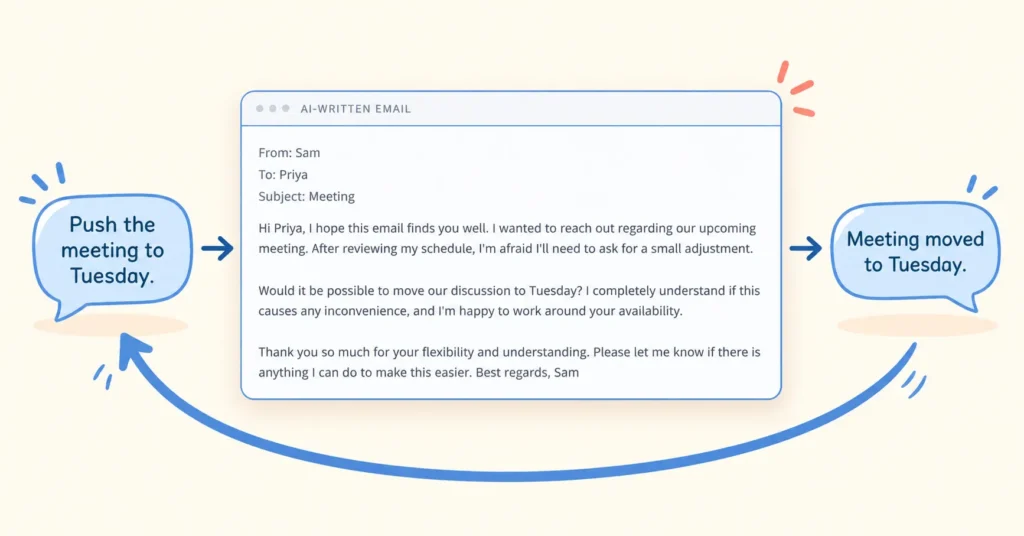
Take the simplest message in office life: “Push the meeting to Tuesday.” Five words, and everyone who reads it knows exactly what it means. But it feels a bit blunt, so you open your email assistant and ask it to make the message more professional. A few seconds later you have this:
Hi Priya, I hope this email finds you well. I wanted to reach out regarding our upcoming meeting. After reviewing my schedule, I’m afraid I’ll need to ask for a small adjustment.
Would it be possible to move our discussion to Tuesday? I completely understand if this causes any inconvenience, and I’m happy to work around your availability.
Thank you so much for your flexibility and understanding. Please let me know if there is anything I can do to make this easier. Best regards, Sam
You hit send. On the other side, Priya sees three paragraphs for what should have been a one-line message, does not have time for it, and clicks “summarize.” Her assistant hands back the result: Meeting moved to Tuesday.
So two language models just spent a round trip turning five words into a hundred and back into five, and neither human read the middle part. That is the AI productivity loop in its smallest form.
What Matters: The same tools now sell us both the button that inflates a message and the button that deflates it. The work didn’t get lighter, it just moved around, and a few things got more expensive along the way: attention, trust, and a bit of electricity.
The email above is our own illustration, but the buttons are real.
Both Buttons Live in the Same Inbox
This isn’t a hypothetical workflow, because the tools exist and ship together. Gmail’s Help Me Write can draft a full email from a short prompt, and the same Gmail now summarizes long threads with AI Overviews. Microsoft’s Copilot in Outlook does both as well: it drafts your message and condenses the thread on the other end. The inflate button and the deflate button sit a few clicks apart, sold by the same company.
That’s the strange part. If one side is paying to make text longer and the other side is paying to make it shorter, then the thing being passed between them was never needed.
Where the Time Actually Goes
AI writing tools are sold as a way to communicate faster, so you’d expect the saved time to show up somewhere. A closer look at the research suggests it often just changes address.
Cheap to produce. Expensive to receive.
AI-generated work that looks finished but doesn’t move the task forward.
Stanford’s Social Media Lab and BetterUp surveyed 1,150 full-time US desk workers in September 2025 about what they called workslop, which is AI-generated work that looks finished but doesn’t move the task forward. About 40% said they had received some in the last month, and respondents estimated roughly 15% of the work they get fits the description. On average, each incident took close to two hours to sort out, which the researchers turned into about $186 per employee per month, or over $9 million a year for a 10,000-person company.
Keep the numbers in perspective: Workslop is a wider problem than padded emails, and these numbers come from self-reported estimates of time lost, so treat the dollar figure as a rough size, not a measurement.
But the shape of the finding matches our loop: it’s cheap to produce and expensive to receive. The sender saves half a minute of being polite, and the receiver either spends that half minute reading or pays for a second AI call to undo it.
That’s why we’d call text a zero-sum game here. Nobody is adding information. One side adds words, the other removes them, and the bullet point at the end carries the same content the five-word message started with.
What One Pass Through the AI Productivity Loop Costs in Electricity
The environmental part of this needs some care, because the honest numbers are smaller than the dramatic version. Google published figures in August 2025 for the median text prompt in its Gemini app: about 0.24 watt-hours of energy, 0.03 grams of CO2 equivalent, and 0.26 milliliters of water, roughly five drops. Google compares the energy to watching television for under nine seconds.
That is also about ten drops of water using Google’s median figure.
Run that AI productivity loop through our example. If writing the email and summarizing it each count as one median prompt, the round trip costs around 0.5 Wh and about ten drops of water. That is nothing you would ever notice on an electricity bill. Those figures are Google’s own, they cover only text prompts, and independent estimates run higher. A 2024 study from the Electric Power Research Institute put a typical ChatGPT prompt at around 2.9 Wh, for example.
Scale is where it becomes worth mentioning. As an illustration, if a 10,000-person company ran ten of these loops per person per day at Google’s median figure, that would be about 48 kWh a day spent on messages that get deleted on arrival. It’s not a scandal, but it’s real GPU time, and what it buys is a greeting that someone’s software then removes. Our view is that this is less an environmental argument than a question of what we choose to spend compute on, and “I hope this email finds you well” is a strange thing to spend it on.
Why Politeness Stopped Working
The reason the AI productivity loop happens in the first place is a social one. Many of us treat a short message as a rude one, so we want the speed of a text but feel obliged to perform an email. Historically that performance meant something because it cost the sender effort. Taking the time to write warmly was the signal.
The sender spends time choosing the words.
The machine supplies the polish in seconds.
Once a machine writes the warmth, the signal is gone, and there’s evidence readers notice. Peter Cardon and Anthony Coman surveyed 1,100 US professionals on how they judged messages from supervisors written with different levels of AI help. When the AI help was light, 83% saw the supervisor as sincere. When it was heavy, that fell to between 40% and 52%. Perceived professionalism also dropped, from 95% to between 69% and 73%. So the heavily polished version came across as less sincere and also less professional, which is the opposite of what the polish was for.
Sincerity
Professionalism
There are limits to that study. Participants were shown which parts were AI-written, which real inboxes don’t do, and people judged their own AI use more leniently than their boss’s. The researchers also found that routine messages like meeting reminders were fine to automate, while praise, empathy and feedback were where trust suffered. Our reading is that the problem was never AI itself. It’s padding, because padding exists to signal effort, and effort is exactly what a prompt doesn’t contain. In real life nobody needs a label either: a reschedule that arrives as three paragraphs is already telling you how it was made.
Just Send the Bullet
If both sides already know the wrapping paper is synthetic, and the receiver’s software is going to tear it off anyway, we should stop making it. That means treating brevity as a normal way to talk to colleagues, not as aggression: “Can we move this to Tuesday? 10am works for me” is a complete, polite message, and it will survive any summarizer unchanged.
None of this is an argument against using AI at work. It’s useful for drafting hard documents, checking facts, cleaning up a message that has to be careful. The point is narrower: when the content is a single fact, the best version of the message is the single fact, and the best use of the assistant is to stay out of it.
Sources & Fact Check
The research and documentation behind this article.