UNPACKED DAILY EXPLAINED
Mbps vs MBps: The Capital Letter That Makes Your Internet Look 8x Faster
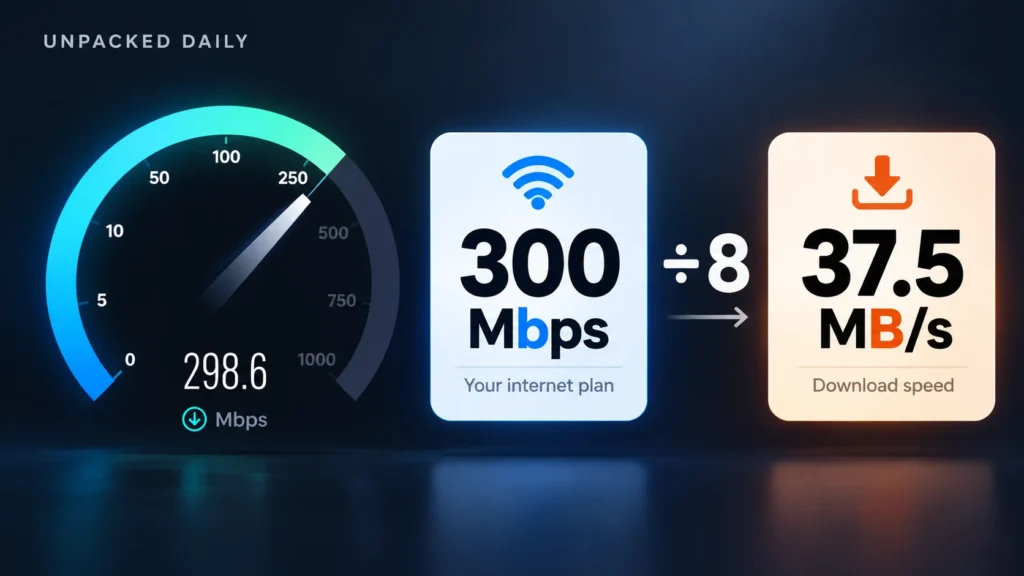
You pay for a 300 Mbps plan, run an Ookla Speedtest, and the dial lands close to 300. Then you start a download in Steam or Chrome and the speed sits around 35 MB/s. Same connection, same minute, and the number looks almost nine times smaller. Most people decide something is broken.
Nothing is broken. This is the Mbps vs MBps problem: the two numbers are measured in different units, and the only visible difference between them is the case of one letter. A small “b” means bits. A capital “B” means bytes. Your ISP sells you megabits per second (Mbps). Your computer shows file downloads in megabytes per second (MB/s). One byte is eight bits, so every speed on your plan page shrinks by a factor of eight the moment you download an actual file.
THE CONVERSION
Mbps vs MBps: The Math
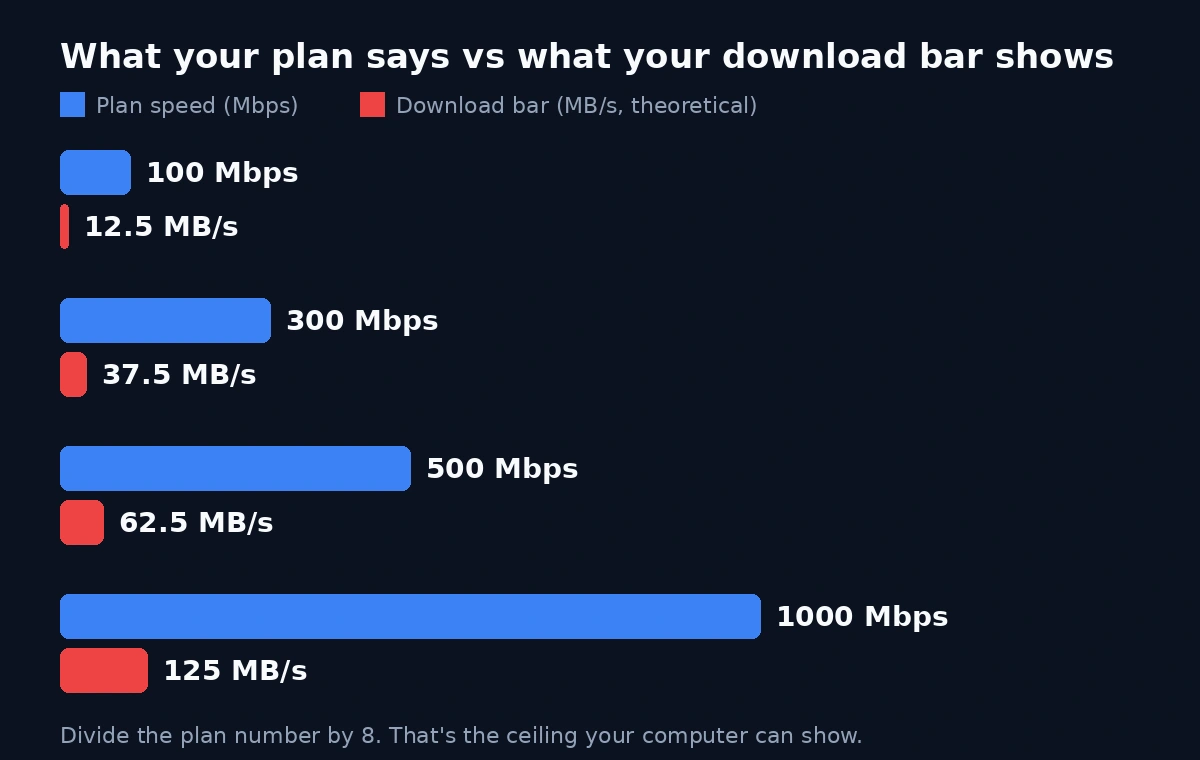
To convert, divide the number on your plan by 8:
These figures are the theoretical ceiling, and you won’t see them exactly. Data travelling over the internet is wrapped in headers and packet framing, which is protocol overhead. On a typical wired connection, that overhead takes a few percent, so real downloads usually land at around 90-95% of the theoretical number. On a 300 Mbps plan, that puts you somewhere between roughly 34 and 36 MB/s, not 37.5.
Speedtest has its own small gap. Ookla’s test opens multiple connections and measures raw transfer, so on a healthy line it usually reports close to your plan speed. It won’t hit it exactly every time, and it can come in a bit under or occasionally a bit over, depending on how your ISP provisions the line and how busy it is. If your test says 287 on a 300 plan, that is a normal result, not a scandal.
IN REAL LIFE
What this looks like with a real download
Take a 50 GB game on Steam. Steam shows speeds in MB/s by default, so you see the byte number, not the bit number.
At the theoretical 37.5 MB/s, that download takes about 22 minutes. At a realistic 34-36 MB/s, it takes closer to 23-25 minutes. If you were mentally using the 300 figure from your plan (as in “300 megabytes a second, so under three minutes”), you were off by a factor of eight, and the progress bar will feel like a betrayal.
SAME IDEA IN CHROME
Chrome does the same thing. Download a large video file and the progress indicator reports in MB/s. The speed is exactly what your connection is capable of, just in a unit your ISP never uses when it talks to you.
This is why the confusion is so persistent. The Speedtest result and the download bar both look like “your internet speed,” but they speak different languages. Nothing on screen tells you to divide by eight, so you assume the gap is a defect.
THE SALES NUMBER
Why ISPs keep it this way
The usual explanation is that network engineers have always counted transmission in bits, and that is true. But it is not a good enough reason to keep consumer plan pages this way in 2026.
Nobody is buying a “transmission rate.” People buy the ability to download a PS5 game, a movie, or a work file faster. The number they care about is the one they see on their screen, and that number is in bytes. If Airtel or Jio sold plans by what you see when you download, the plan page would say “37.5 MB/s.” That doesn’t sound like much. “300 Mbps” sounds fast, and it has a round, confident look next to the 100 Mbps tier.
So there’s no incentive to change. The bigger number is accurate, so nobody can accuse the ISP of lying, and it makes every plan look eight times more impressive than the same plan expressed in the unit people actually experience. Storage makers do something similar with GB and GiB, but that gap is about 7%. Here, the Mbps figure is 700% larger than the equivalent MB/s figure.
Our view: this isn’t an accident of history anymore, it’s a choice. A company that wanted customers to understand what they were buying would put both numbers on the plan page. Almost none do, and that is the tell.
THE FINE PRINT
“Up to” does a lot of work
The unit isn’t the only fine print on that plan page. Indian broadband is usually sold as “up to” a certain speed, and operators typically say the speed depends on network congestion and conditions. So “300 Mbps” is a ceiling the ISP is allowed to miss, not a number it promises.
This is the minimum capability used in the definition, not a speed promise for your plan.
There’s also no meaningful floor under it. In early 2023 the government updated the official definition of broadband to a minimum download speed of 2 Mbps, up from 512 kbps, which had stood since 2013. The change followed a TRAI recommendation. That’s a baseline for a connection to legally be called “broadband,” and it’s measured as capability at the provider’s end, not what reaches your router. It’s a safety net for a dead connection, not a performance promise about the 300 Mbps plan you’re actually paying for. The government’s historical comparison also records the change from 512 Kbps to 2 Mbps in its broadband figures.
Put the two gaps together and you get the real picture. First you divide by 8, so 300 Mbps becomes 37.5 MB/s. Then you lose another 5-10% to protocol overhead, and a bit more at peak hours when the neighbourhood is streaming. A download bar sitting around 32-35 MB/s on a 300 Mbps plan is normal. A bar at 10 MB/s on the same plan, wired, at 11 pm, is worth a call to support.
Our view: the unit gap is the part you can’t do anything about, but “up to” is the part you can test. Run a wired Speedtest at a few different times of day and save the screenshots. If the numbers sit far below your plan every evening, you’ve got something concrete to take to the ISP, and a complaint with data gets taken more seriously than “my internet feels slow.”
BEFORE YOU SPEND
Where this actually costs people money
The real cost isn’t confusion, it’s money spent on the wrong fix.
When people see a gap between the Speedtest number and what their downloads show, a lot of them blame the Wi-Fi. They buy a mesh system or a set of extenders, often for several thousand rupees, expecting their download speed to jump toward the headline figure. In many cases it doesn’t, because the speed they were seeing was already near the correct ceiling for their plan.
To be fair, Wi-Fi can absolutely be the problem. A 300 Mbps plan on a congested 2.4 GHz band, with a router at the far end of the flat and two concrete walls in between, will not deliver anything close to 300. Plenty of homes do have a weak-signal problem, and a mesh system is the right answer there.
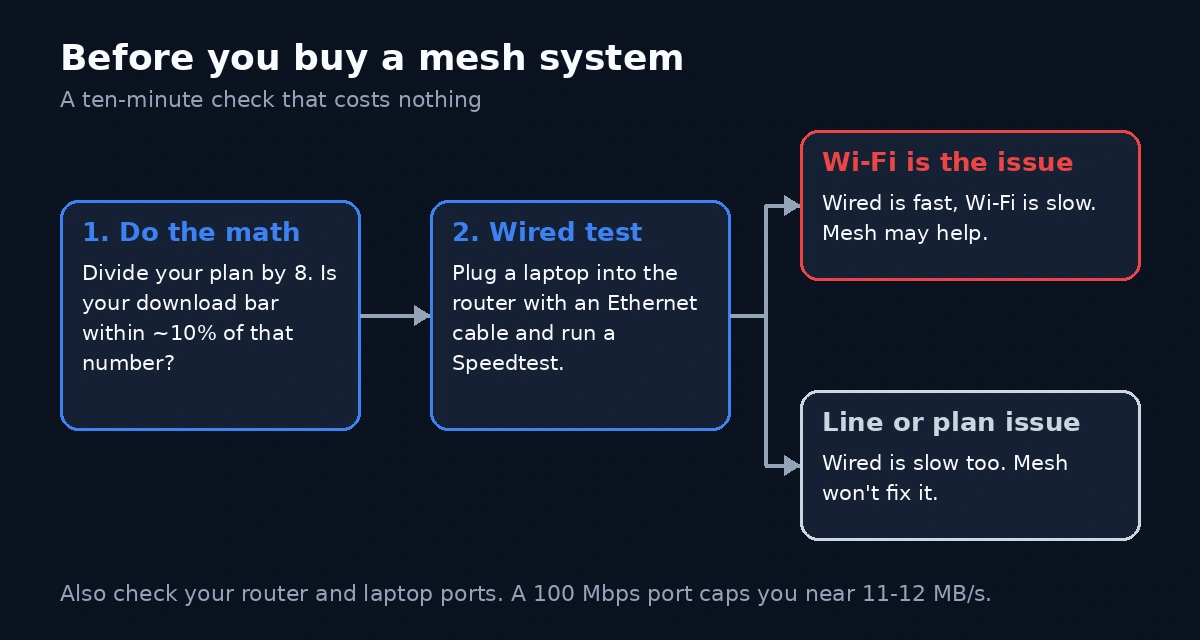
So the order matters. Check the math first, then test the hardware, then spend money.
-
01
Do the division.
If your download bar shows 33-36 MB/s on a 300 Mbps plan, you are already getting what you paid for.
-
02
Run a LAN cable test.
Plug a laptop directly into the router with an Ethernet cable and run a Speedtest. If the wired result is close to your plan speed and the Wi-Fi result is much lower, then the Wi-Fi is the bottleneck and a better setup is worth considering. If the wired result is also low, the problem is the line or the plan, and a mesh system won’t fix it.
-
03
Check your own ports.
Some older routers and laptops still have 100 Mbps Ethernet ports. A 300 Mbps plan through one of those will top out around 11-12 MB/s, no matter how good your Wi-Fi is.
That test takes about ten minutes and costs nothing. It separates the “I misread the units” problem from the “my Wi-Fi is weak” problem, and only the second one is worth paying to solve.
THE TAKEAWAY
How we read this
The unit gap is not a scam, and ISPs aren’t breaking any rule by using it. But it is a convenient piece of confusion that the industry has no reason to clear up, and customers pay for that in frustration and sometimes in hardware they didn’t need.
The practical fix is a habit. When you see a speed, check the “b.” If it’s lowercase, divide by eight before you decide anything. If your download speed is within about 10% of the converted figure, your connection is fine, and the thing to upgrade (if anything) is your plan, not your router.
Your ISP is counting pizza slices, and your computer is counting whole pizzas. Both are right, but only one of them tells you how much dinner you actually got.