AVIF vs WebP vs JPEG XL: Which Image Format Should You Use?
AVIF vs WebP isn’t a simple winner. AVIF often creates smaller files, WebP is easier to fit into many existing workflows, and JPEG XL has some useful tricks of its own.
The catch is that image size, encoding time and browser support don’t always point to the same format. A clean screenshot, a grainy photo and a detailed illustration can produce different results.
For most WordPress sites, use AVIF when your image optimiser or CDN can generate and deliver it reliably. Keep WebP or JPEG as fallbacks. Treat JPEG XL as an optional extra, not the only format your visitors can receive.
Smaller files don’t always mean a better result
Comparing each format at the same quality setting can be misleading. A setting of 80 in WebP doesn’t guarantee the same visual quality as 80 in AVIF. The useful comparison is how large the files are when they’re adjusted to look similarly good.
AVIF vs WebP: What the test found
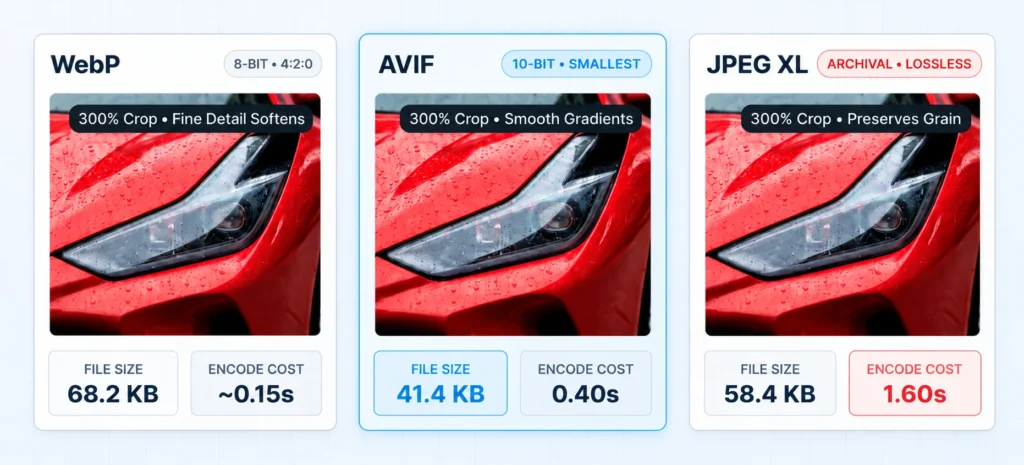
These figures come from Level UI’s October 2026 benchmark . Its 12-image set included renders and screenshots, not a broad collection of camera photographs. Treat the results as a useful comparison, not a rule that applies to every image.
| Format | Where it stands out | The trade-off |
|---|---|---|
| WebP | Broad support, quick encoding and a dependable web format. | AVIF often produces smaller files at similar quality, but not for every image. |
| AVIF | Often smaller files for photos, screenshots and illustrations at similar visual quality. | Encoding can take longer. Fine grain and texture can change the result. |
| JPEG XL | High-quality and lossless workflows, including smaller copies of existing JPEGs without further image loss. | Browser support is improving, but the standard WordPress workflow is less straightforward. |
Where JPEG XL gets interesting
In Jake Archibald’s October 2026 comparison , AVIF usually produced smaller lossy files for photos and was stronger for screenshots and illustrations. JPEG XL stood out for lossless compression and could shrink existing JPEG files by around 9–20% without further loss.
We cover that matchup in more detail in our JPEG XL vs AVIF comparison .
A smaller file is useless if your site can’t deliver it properly
WebP and AVIF work in nearly all modern browsers. The latest WebP and AVIF compatibility data estimates global support at about 97.2% and 96.4%, respectively, using September 2026 browser-usage figures.
Works across virtually all modern browsers and tools.
Widely supported, with a small compatibility gap compared with WebP.
Chrome 155 and Firefox 158 enabled support by default. Safari support is partial, and Edge remains unsupported in current compatibility data. Check current support.
What this means for WordPress
WordPress 7.1 introduced browser-based image processing using WebAssembly. On supported Chrome and Edge setups, it can resize images, convert formats and generate image sizes in the browser, reducing the work done by your hosting server. When the browser or device doesn’t qualify, WordPress falls back to server-side processing. WordPress explains the changes here .
But uploading an image and serving an optimised image to visitors are different jobs. Your image-optimisation plugin, theme and CDN still determine which formats are generated and delivered. WordPress 7.1 also doesn’t provide JPEG XL in its standard client-side conversion pipeline.
What should a WordPress site actually use?
AVIF
Use it when your optimiser or CDN produces visibly good images at smaller file sizes and can deliver them reliably. It is worth testing on large images where saving bytes matters.
WebP
Keep using it if your current setup handles WebP well. It is widely supported, quick to encode in many workflows and still a sensible choice for an everyday blog.
JPEG XL
Consider it for specific high-quality or lossless needs when you control image delivery. Don’t make it your only format while browser and WordPress support remain uneven.
Don’t judge by file size alone
Check your photographs, screenshots, illustrations and grainy images separately. Compare them at similar visual quality, not just the same encoder setting. If the smaller file looks worse, the saving may not be worth it.
If you’re managing the formats manually
The HTML picture element lets the browser choose a
supported format and fall back when necessary. This is a simple
example; an image optimiser or CDN can manage the variants for
you instead.
<picture>
  <source srcset="hero.avif" type="image/avif">
  <source srcset="hero.webp" type="image/webp">
  <img src="hero.jpg"
       width="1200" height="630"
       alt="Describe the image">
</picture>
For a WordPress blog, I’d start with AVIF and WebP delivery through a reliable optimiser or CDN, with a JPEG fallback where needed. If your current setup only handles WebP reliably, keep it rather than adding a fragile conversion process just to chase smaller files.
Our guide to image compression and smaller uploads covers the other half of the problem: making files smaller without damaging the image.
There isn’t one winner for every image. Use the format that gives you the right balance of visual quality, file size, encoding cost and reliable delivery.
The benchmark figures in this article come from the linked third-party tests. Their images, encoders and settings differ, so the results should not be treated as one combined test.