
Let’s talk about PHP
Everyone says it’s dead. The web still runs on it.
PHP has been called outdated for years. Developers move to newer languages, new frameworks appear every few months, and PHP often gets treated like something the internet should have left behind.
Then, on October 21, 2026, two critical security vulnerabilities in PHP’s core engine triggered an urgent response across the web. Government services in several European countries were temporarily taken offline, while Wikipedia and the Internet Archive also shut down some systems while they dealt with the risk. As Reuters reported, organisations were scrambling to install fixes or reduce their exposure.
These shutdowns were precautionary measures, not proof that every affected organisation had been hacked. But they showed how quickly a problem in one widely used piece of software can spread across the internet.
The software at the centre of it all was PHP. And the numbers explain why the story matters.
What PHP actually does
Think about opening an article on a news website. The page has to come from somewhere, and there may be work to do before it reaches you.
You open a page
Your browser requests an article, product page or account screen.
BROWSERPHP runs
The server executes application code and works out what the page needs.
SERVERData is collected
The application can retrieve article content, user details or other data.
DATABASEThe page arrives
The server sends the response, usually containing HTML, to your browser.
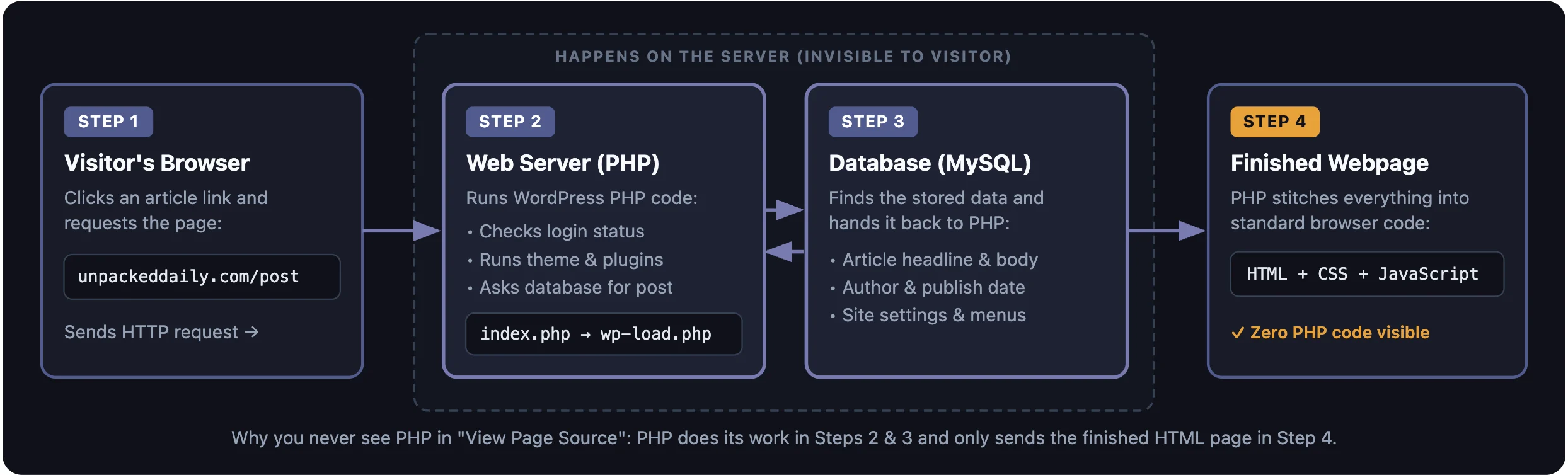
RESPONSEWordPress uses it to run its application logic, load content and generate responses. Your browser normally receives the resulting page, not the PHP source code that created it.
This is a simplified example. Not every request needs a database lookup, and some websites serve cached pages without running PHP for every visit.
What happens when you open a WordPress page?
From the first click to the finished webpage, here’s what happens behind the scenes.
The web didn’t rebuild itself just because developers moved on.
PHP’s biggest advantage isn’t that every developer loves it. It’s that a huge amount of working software already depends on it.
WordPress
WordPress powers more than 40% of websites, according to W3Techs. Its publishing system, themes and plugins make PHP part of an enormous existing ecosystem.
Check WordPress usage ↗The tools around it
Drupal, Joomla, MediaWiki and online store platforms have long used PHP. Years of extensions, integrations and hosting support have grown around these systems.
A mature ecosystemThe cost of starting over
A working site may already have years of content, customer accounts, payments and business logic. Rebuilding it in another language takes money and introduces new risks.
Working software has valueThat is the part developers sometimes overlook. Choosing a language for a new project is one decision. Replacing a system that already does its job is another. PHP doesn’t need to win every developer debate to remain important to the web.
PHP isn’t automatically better. Neither are the alternatives.
PHP, Python, Node.js and Go can all power websites. The useful question is what you are building and how you plan to run it.
Good fit for many traditional websites
A request comes in, PHP runs the application code, and the server sends the response. PHP-FPM workers can serve multiple requests over time rather than starting a completely new worker for every visit.
WHAT IT OFFERS- Established content management systems
- Widely available hosting
- Libraries and frameworks built for the web
Useful for many kinds of applications
These ecosystems support long-running services, background jobs, web APIs, real-time connections and many other workloads. Their exact behaviour depends on the framework and deployment model.
WHAT THEY OFFER- Different concurrency and service models
- Large libraries and specialist tools
- Options for custom applications and services
One important distinction: a PHP worker can be reused for later requests, and long-running services in other languages can also isolate work across processes or workers. None of these choices guarantees safety on its own. Application design, configuration, coding practices and updates still matter.
PHP2Shell: when a request goes wrong
PHP normally cleans up request-related data as a request finishes. These vulnerabilities exposed cases where that process could fail in ways that mattered for security.
CVE-2026-109618
When PHP runs out of memory, it can interrupt the current operation. In the vulnerable path, internal request data could be left only partly initialised. Later cleanup code could then treat invalid data as if it were valid.
CVE-2026-109619
Some internal PHP state could retain a reference to memory that had already been freed. Under particular conditions, a later request handled by the same worker could encounter that stale state before it was properly reset.
A simplified view of the stale-state problem
This is a simplified explanation of the stale-state vulnerability, not a claim that every failed PHP request or every worker behaves this way.
Researchers demonstrated that the vulnerabilities could be developed into remote code execution attacks without authentication. That could allow an attacker to run code on an affected server, depending on the vulnerable runtime and server configuration.
Read the official PHP security advisory ↗The bug was old. Finding a workable attack was the hard part.
The PHP2Shell story isn’t about a bug suddenly appearing in October. The vulnerable code had been around for years. What changed was the ability to investigate it and demonstrate how it could be exploited.
Wiz Research
Wiz reported using its Wiz Atlas research tool along with Google’s Gemini 4 Argon and OpenAI’s GPT-5.6 Sol. The team described how AI-assisted research helped uncover the flaws and develop working attack paths.
Read Wiz’s research ↗Calif Research
Calif also reported an independent discovery, with help from a large language model. Its technical write-up follows the history of the underlying issue and explains how the team approached the vulnerability.
Read Calif’s research ↗AI can make difficult security work easier to explore.
It can help researchers understand a codebase, investigate possible failure paths, test ideas and work towards an exploit. But a hypothesis still needs to be tested, the result still needs to be checked, and a vulnerability still needs to be reported and fixed.
This is a bigger issue than PHP alone. AI can help defenders find old weaknesses, but it can also make it easier for attackers to investigate weaknesses after they become known. We’ve explored a related problem in our piece on the AI productivity loop: faster output is useful, but the result still needs to be checked.
The fixes are out. Updating is the important part.
The PHP team released security updates on October 21, 2026. If you run a PHP website, check the runtime version and make sure the relevant patch has actually been applied.
Check your version
These are the fixed upstream versions for the supported branches listed in the October 21 advisory. Linux distributions and hosting vendors may provide patched packages of their own. Check the official PHP advisory for the full guidance.
What site owners should check
Check your hosting control panel or ask your provider which PHP version is serving the website.
Update the runtime, or confirm that your distribution or hosting provider has applied the corresponding security patch.
Updating WordPress core, themes or plugins does not necessarily update the PHP runtime underneath them. They are separate parts of the website.
PHP 8.1 and older branches are outside regular upstream support. Limited backports and vendor-maintained fixes may be available, but you need to confirm that your particular installation is protected. PHP 8.2 is also scheduled to reach end of life on December 31, 2026.
PHP also published an informational advisory about an additional,
unlikely attack path involving a specific combination of session
settings and upload-progress handling. The team recommended temporarily
disabling session.upload_progress.enabled until the next
regular bug-fix release. This is a narrow configuration issue, so
administrators should follow the
official instructions
rather than changing settings without checking their environment.
We use WordPress. So this isn’t just somebody else’s problem.
We run Unpacked Daily on WordPress, which means PHP is part of the publishing system we rely on. We don’t need to write PHP code every day to depend on it. Every time the site runs its application logic, PHP can be part of that work.
That is how a lot of the web works. You can publish articles, manage images, install a plugin and update a page without ever thinking about the runtime behind it. The technology stays out of sight. Most of the time, that is exactly what you want.
The problem comes when “it still works” becomes the same thing as “it is still safe.” A website can open normally while the software underneath it needs an urgent update.
These are separate layers. Keeping one updated does not automatically mean every other layer is updated too.
The lesson for us is straightforward. We don’t need to change technologies just because a newer one is getting attention. We do need to know what our current setup depends on and keep those parts maintained.
PHP probably isn’t going anywhere. The real question is whether we maintain it.
It is still widely used because it remains useful for a huge number of websites. WordPress alone gives it a reason to stay relevant, and the existing web isn’t going to be rebuilt from scratch overnight.
PHP2Shell showed what can happen when a flaw sits deep inside software that so many systems depend on. It also showed how AI-assisted research can help uncover weaknesses that were difficult to turn into working attacks.
None of this means that older technology needs to be replaced just to look modern. It means we cannot treat software as a finished job simply because it has been running for years.
The web does not run on hype. It runs on the software that is actually installed, and somebody still has to maintain it.
Sources & further reading
The research and advisories behind the security details and usage figures.
Usage figures are dated to October 24, 2026. Security and version guidance should be checked against the current PHP advisory and the relevant hosting or software vendor before taking action.