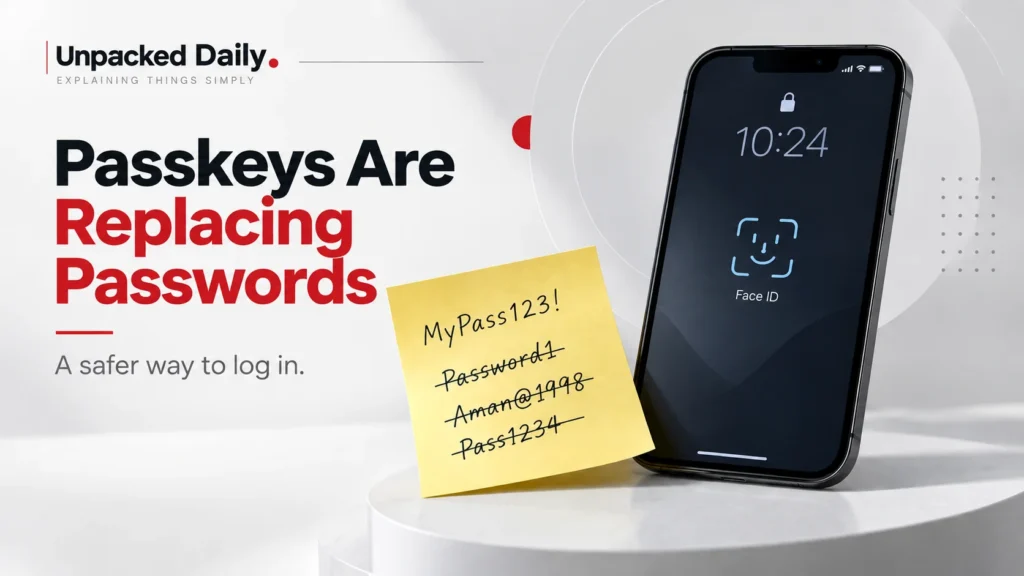
Passkeys replace passwords with a device-based way of signing in. Your phone or computer uses a private key to prove it is really you, while your biometric or PIN simply unlocks that key.
Think about the last few times you logged into something. You typed a password, or your browser did it for you. Then a six-digit code arrived in your messages and you had about half a minute to type it back in. Or your phone buzzed asking if this was you, and you tapped yes. And every once in a while none of it worked, so you hit “forgot password” and a two-minute login turned into ten minutes.
That routine is slowly being replaced, and nobody is making a huge announcement about it. On September 1, Microsoft made passkeys the default sign-in experience in Entra ID and set February 1, 2027 as the date it stops delivering SMS and voice codes itself for most users. Entra is the identity system behind many work and school accounts. In May, the FIDO Alliance said it estimates that 5 billion passkeys are now in use. That number is an estimate, but the direction is pretty clear.
What’s actually being replaced
A password is something you know. You type it, the site checks it, and if it matches, you’re in. The problem is that the password itself is the thing proving you are you. If someone gets it through phishing, guessing or a breach, they can use it.
FIDO’s 2026 survey of 11,000 consumers found that a third had experienced a confirmed compromise or breach notification in the previous year, while 47% said they would be likely to abandon a sign-in or purchase when they could not remember a password. So passwords manage to be both annoying and risky.
SMS codes were basically the patch. You still enter the password, but the website sends a code to your phone to show that you also have the phone. That is better than using a password alone, but the code is still just a number that you have to type somewhere. If that somewhere is a convincing fake website, the attacker can capture it.
Authenticator apps remove the mobile network from the equation, but they still depend on codes or approval buttons. Hardware security keys solve much of this problem, but most normal users never wanted to carry a separate device just to log in.
Passkeys take the same basic security idea and put it into the phone or laptop you already use.
So what actually happens with a passkey?
When you create a passkey, your device creates a pair of keys for that account. The private key stays on your device. The website gets the public key. The private key is protected by whatever you use to unlock your device, such as your face, fingerprint or PIN.
When you log in later, the website sends your device a challenge. You unlock the device, it uses the private key to respond, and the website checks the result with the public key it already has.
You do not type a password. You do not read a code from a text message. And stealing the public key from the website does not give an attacker the private key they need to log in.
The phishing protection is the really important part.
A passkey is tied to the website or app where it was created. So if you land on a fake banking page, your device does not simply hand over the passkey because the page looks convincing. The passkey belongs somewhere else.
With a password or SMS code, the user has to decide whether the website is real. With a passkey, the authentication system handles more of that decision for you.
Microsoft is putting a date on SMS
Microsoft’s change is easy to misunderstand, so there is one important distinction.
This is an Entra ID change aimed at organisations, so it mainly affects work and school accounts. From September 1, users who are enabled for SMS or voice authentication get passkeys switched on automatically and are encouraged to register one.
The date that really matters is February 1, 2027. After that, users in scope who rely only on SMS or voice as their second factor will have to register a passkey to keep signing in. Global administrators and external users get until July 1, 2027.
This does not mean SMS authentication is disappearing from the internet.
Microsoft is retiring its own delivery of SMS and voice authentication. Organisations that genuinely need text-based authentication can connect a telecom provider through the Microsoft Security Store. People already using passkeys, Windows Hello or another phishing-resistant method can continue as before.
The interesting part is that Microsoft is not doing this alone.
Apple added passkeys to iCloud Keychain with iOS 16 in 2022. Google made passkeys the default sign-in method on supported devices in October 2023. Nobody announced that passwords were suddenly over. It has been more of a slow shift, with different companies moving in the same direction.
The awkward parts
Passkeys are not magic. Their biggest awkwardness comes from the fact that they live on devices, and devices get lost, replaced and changed.
Lose your phone and the question becomes recovery. Apple syncs passkeys through iCloud Keychain, while Google syncs them through Google Password Manager. If everything is synced, losing one device is mostly an inconvenience. If you lose everything, you are relying on the recovery system provided by the service.
FIDO’s survey shows that account recovery is one of the concerns holding organisations back, even though 89% of those surveyed said they were confident they could restore access when a passkey was lost. Both things can be true.
Moving between platforms can also be awkward. A passkey in iCloud Keychain is not automatically sitting in Google Password Manager. iOS 26 added a system-level way to transfer passkeys between credential managers, while Android has an API for moving credentials between providers on the same device. But the whole process is still not as simple as moving your photos from one phone to another.
Shared computers are another problem. Passkeys work best when the device belongs to you. FIDO found that 39% of organisations reporting technical barriers pointed to shared-device situations such as kiosks and frontline work. Another 39% were concerned about synced passkeys being exportable.
Where this is going
The interesting question is not really whether passkeys are better than passwords. It is what logging in starts to feel like.
For most of the internet’s history, logging in meant remembering something. Your password, maybe another code after that. With passkeys, it increasingly means your phone or laptop vouching for you after you unlock it. That is smoother, but it moves the weak point.
When your accounts are spread across a hundred passwords, losing one password is a problem. When more of them depend on one synced account and one device unlock method, protecting that account and knowing how to recover it become much more important.
So this is not some magical replacement where every old problem disappears. It is a trade. Some old weaknesses become much harder to exploit, while other parts of the system become more important. And passwords are not going away overnight.
FIDO’s consumer numbers say 90% of people are aware of passkeys and 75% have enabled one on at least some accounts. But only 49% use them whenever possible or most of the time. A lot of logins still begin with a password.
What is changing is what websites offer you first. You may not notice the transition as one big event. You will probably notice it one login at a time. A website asks for a passkey instead of a password. Your phone verifies you. The SMS option becomes harder to find. Eventually, the old way starts feeling like the older way.
The password is not disappearing today. It is simply becoming less central to how you prove that you are you.